Template Language Reference
Those are this report's own sheets, printed by the engine from the template and the payload below — not screenshots kept beside them.
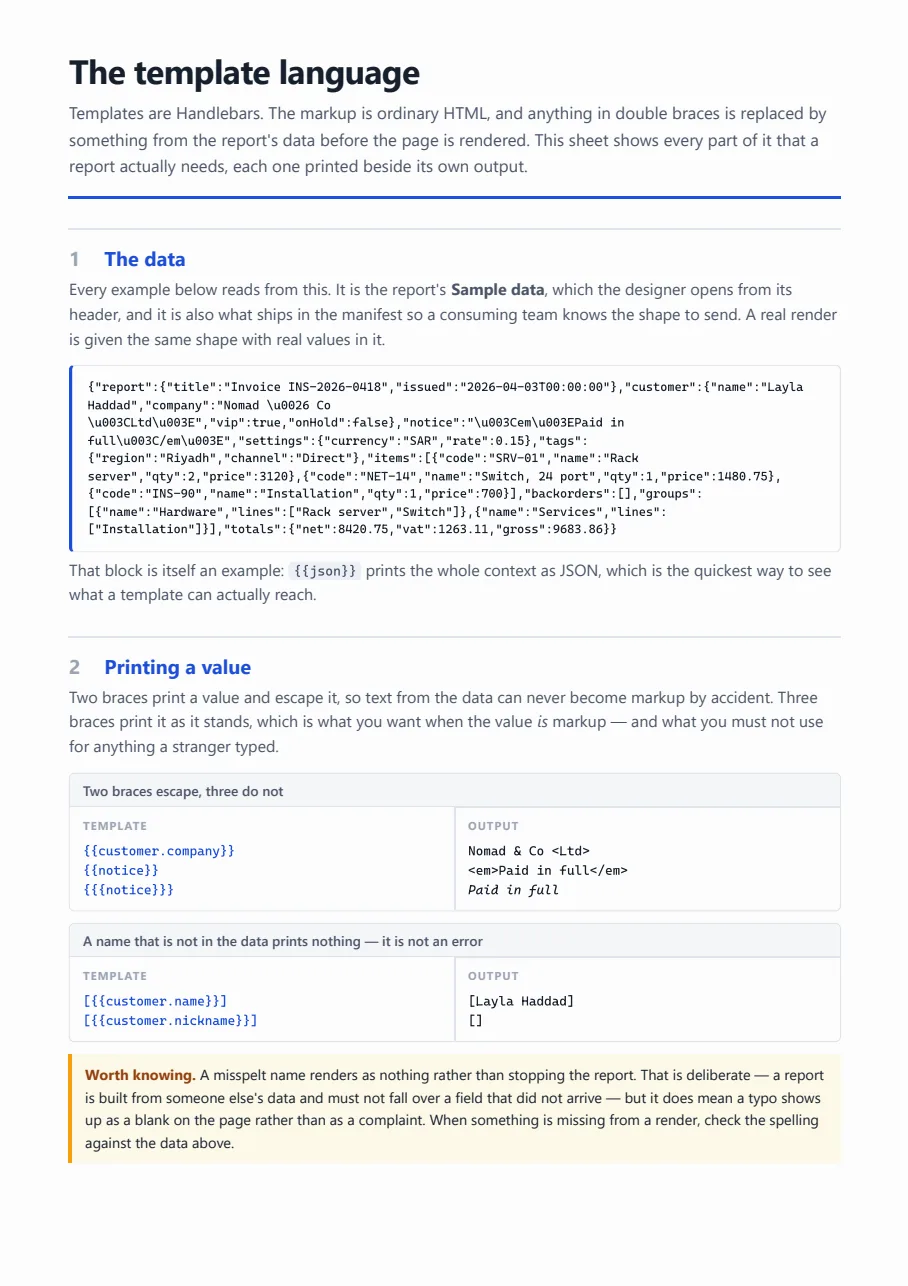
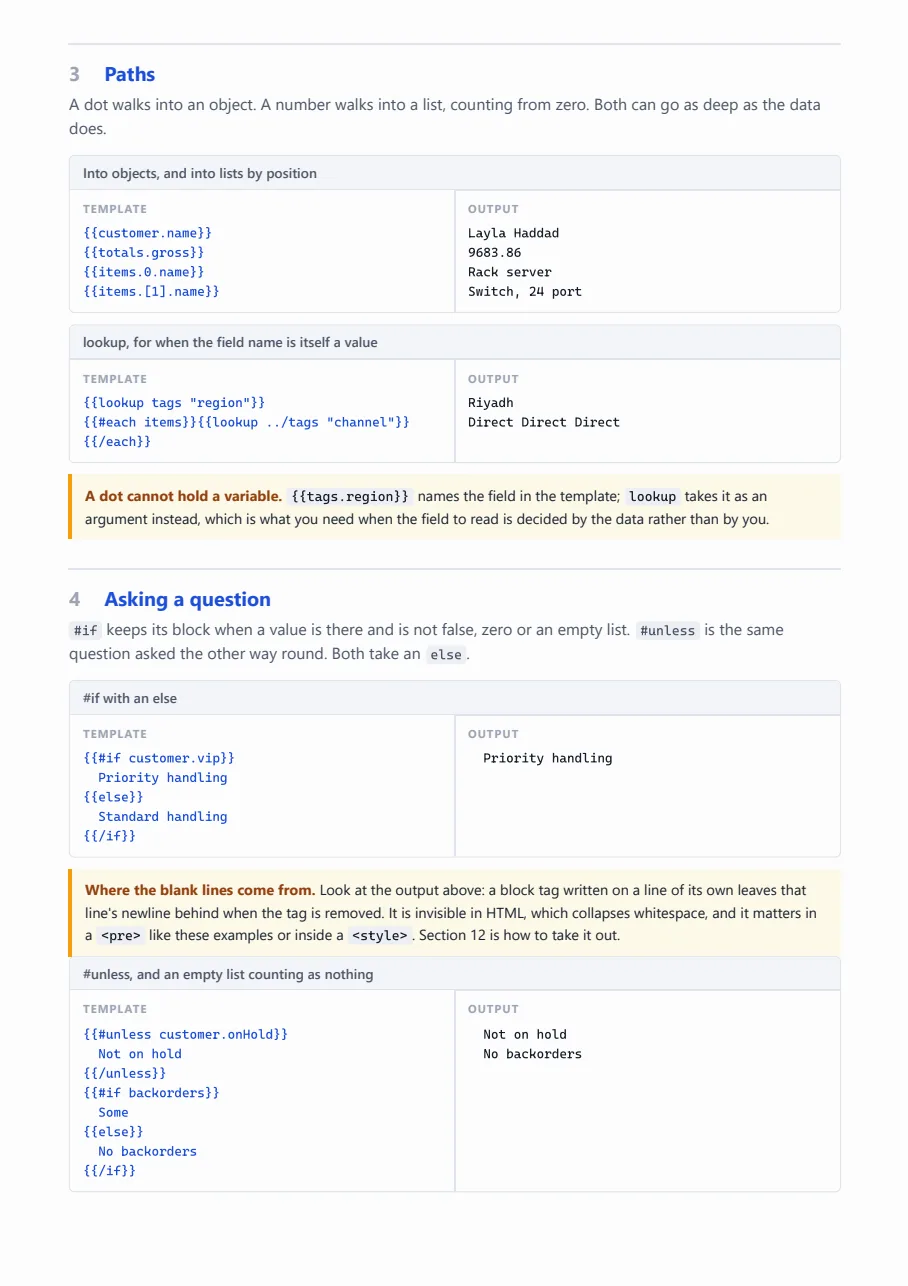
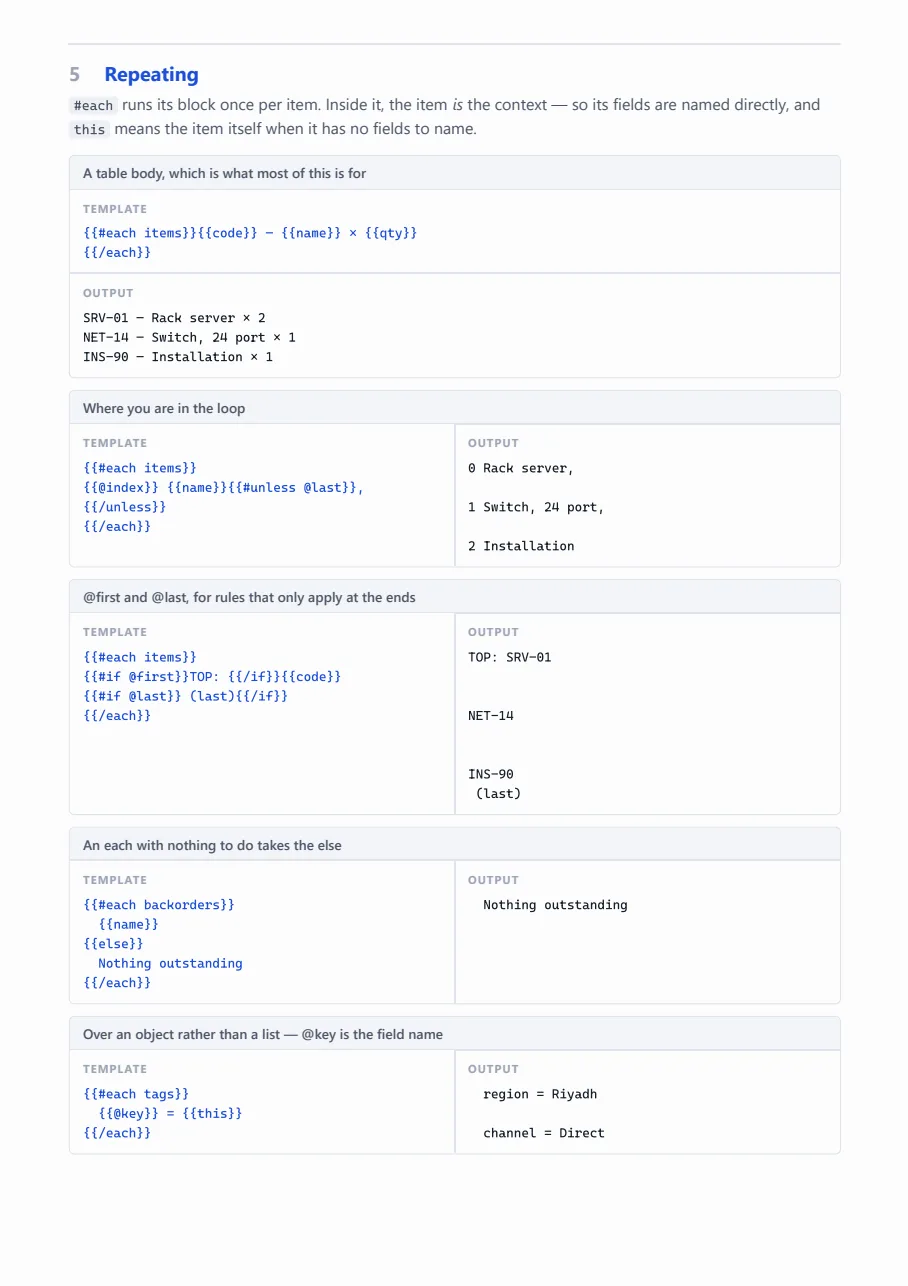
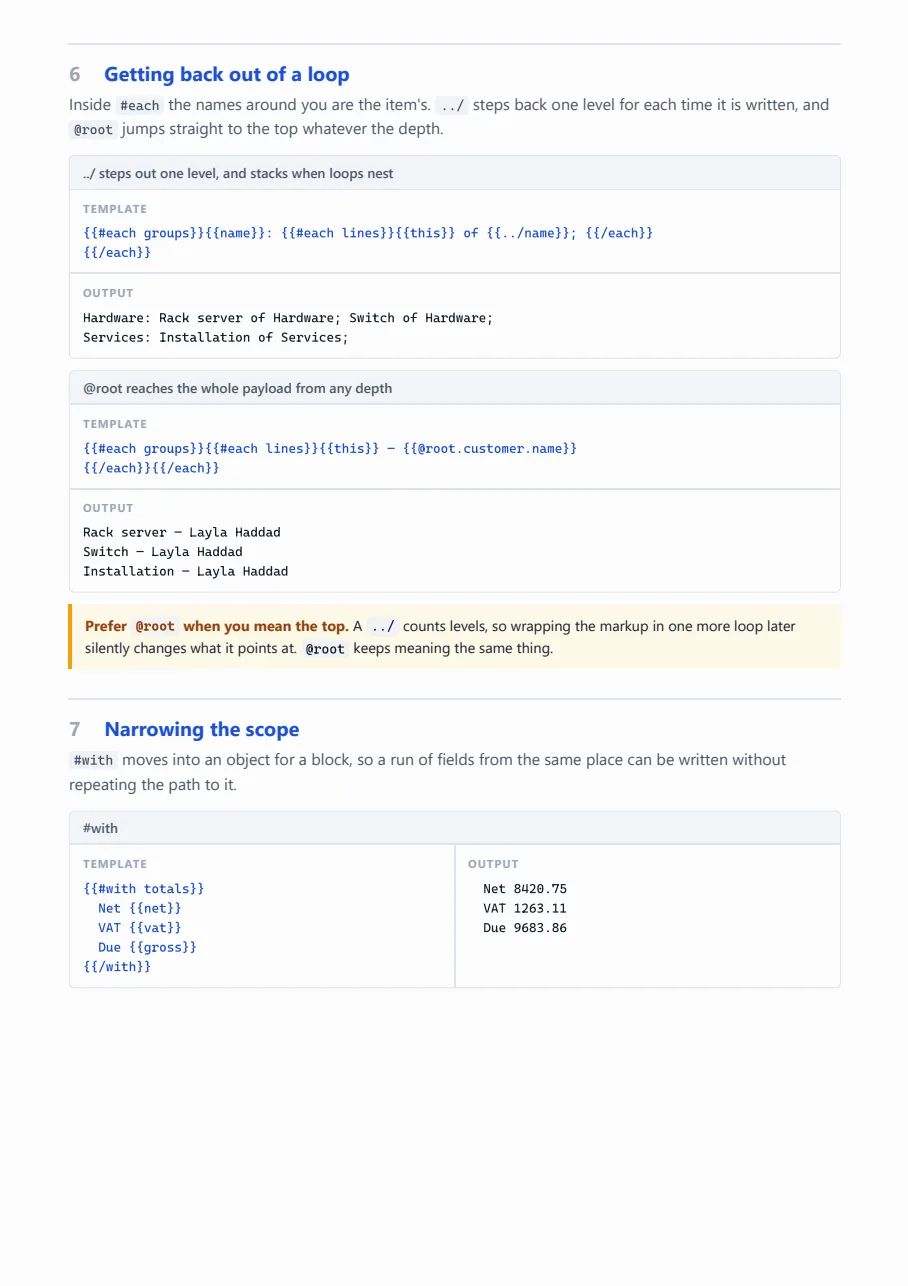
The source
This is the whole thing — the template, the pages that print from it, and the stylesheet
they are dressed in, as HTML with {{ }} bindings. Nothing is generated from a
designer format; what you see here is what the engine renders.
template.html
<!DOCTYPE html>
<html>
<head>
<meta charset="utf-8">

<link rel="stylesheet" href="assets/css/report.css">
</head>
<body>

<script id="report-data" type="application/json">{{json}}</script>

<template id="report-header"></template>
<template id="report-footer"></template>
</body>
</html>
page1.html
<div class="sheet" dir="ltr">
<h1>The template language</h1>
<p class="lede">
Templates are Handlebars. The markup is ordinary HTML, and anything in double braces is
replaced by something from the report's data before the page is rendered. This sheet shows
every part of it that a report actually needs, each one printed beside its own output.
</p>
<h2><span class="ordinal">1</span> The data</h2>
<p class="section-note">
Every example below reads from this. It is the report's <b>Sample data</b>, which the designer
opens from its header, and it is also what ships in the manifest so a consuming team knows the
shape to send. A real render is given the same shape with real values in it.
</p>
<div class="data">
<pre>{{json}}</pre>
</div>
<p class="section-note">
That block is itself an example: <code>\{{json}}</code> prints the whole context as JSON, which
is the quickest way to see what a template can actually reach.
</p>
<h2><span class="ordinal">2</span> Printing a value</h2>
<p class="section-note">
Two braces print a value and escape it, so text from the data can never become markup by
accident. Three braces print it as it stands, which is what you want when the value <em>is</em>
markup — and what you must not use for anything a stranger typed.
</p>
<div class="eg">
<div class="eg-title">Two braces escape, three do not</div>
<div class="eg-body">
<div class="eg-in"><pre>\{{customer.company}}
\{{notice}}
\{{{notice}}}</pre></div>
<div class="eg-out"><pre>{{customer.company}}
{{notice}}
{{{notice}}}</pre></div>
</div>
</div>
<div class="eg">
<div class="eg-title">A name that is not in the data prints nothing — it is not an error</div>
<div class="eg-body">
<div class="eg-in"><pre>[\{{customer.name}}]
[\{{customer.nickname}}]</pre></div>
<div class="eg-out"><pre>[{{customer.name}}]
[{{customer.nickname}}]</pre></div>
</div>
</div>
<p class="note">
<b>Worth knowing.</b> A misspelt name renders as nothing rather than stopping the report. That
is deliberate — a report is built from someone else's data and must not fall over a field that
did not arrive — but it does mean a typo shows up as a blank on the page rather than as a
complaint. When something is missing from a render, check the spelling against the data above.
</p>
<h2><span class="ordinal">3</span> Paths</h2>
<p class="section-note">
A dot walks into an object. A number walks into a list, counting from zero. Both can go as deep
as the data does.
</p>
<div class="eg">
<div class="eg-title">Into objects, and into lists by position</div>
<div class="eg-body">
<div class="eg-in"><pre>\{{customer.name}}
\{{totals.gross}}
\{{items.0.name}}
\{{items.[1].name}}</pre></div>
<div class="eg-out"><pre>{{customer.name}}
{{totals.gross}}
{{items.0.name}}
{{items.[1].name}}</pre></div>
</div>
</div>
<div class="eg">
<div class="eg-title">lookup, for when the field name is itself a value</div>
<div class="eg-body">
<div class="eg-in"><pre>\{{lookup tags "region"}}
\{{#each items}}\{{lookup ../tags "channel"}} \{{/each}}</pre></div>
<div class="eg-out"><pre>{{lookup tags "region"}}
{{#each items}}{{lookup ../tags "channel"}} {{/each}}</pre></div>
</div>
</div>
<p class="note">
<b>A dot cannot hold a variable.</b> <code>\{{tags.region}}</code> names the field in the
template; <code>lookup</code> takes it as an argument instead, which is what you need when the
field to read is decided by the data rather than by you.
</p>
<h2><span class="ordinal">4</span> Asking a question</h2>
<p class="section-note">
<code>#if</code> keeps its block when a value is there and is not false, zero or an empty list.
<code>#unless</code> is the same question asked the other way round. Both take an
<code>else</code>.
</p>
<div class="eg">
<div class="eg-title">#if with an else</div>
<div class="eg-body">
<div class="eg-in"><pre>\{{#if customer.vip}}
Priority handling
\{{else}}
Standard handling
\{{/if}}</pre></div>
<div class="eg-out"><pre>{{#if customer.vip}}
Priority handling
{{else}}
Standard handling
{{/if}}</pre></div>
</div>
</div>
<p class="note">
<b>Where the blank lines come from.</b> Look at the output above: a block tag written on a line
of its own leaves that line's newline behind when the tag is removed. It is invisible in HTML,
which collapses whitespace, and it matters in a <code><pre></code> like these examples or
inside a <code><style></code>. Section 12 is how to take it out.
</p>
<div class="eg">
<div class="eg-title">#unless, and an empty list counting as nothing</div>
<div class="eg-body">
<div class="eg-in"><pre>\{{#unless customer.onHold}}
Not on hold
\{{/unless}}
\{{#if backorders}}
Some
\{{else}}
No backorders
\{{/if}}</pre></div>
<div class="eg-out"><pre>{{#unless customer.onHold}}
Not on hold
{{/unless}}
{{#if backorders}}
Some
{{else}}
No backorders
{{/if}}</pre></div>
</div>
</div>
<h2><span class="ordinal">5</span> Repeating</h2>
<p class="section-note">
<code>#each</code> runs its block once per item. Inside it, the item <em>is</em> the context —
so its fields are named directly, and <code>this</code> means the item itself when it has no
fields to name.
</p>
<div class="eg eg--stacked">
<div class="eg-title">A table body, which is what most of this is for</div>
<div class="eg-body">
<div class="eg-in"><pre>\{{#each items}}\{{code}} — \{{name}} × \{{qty}}
\{{/each}}</pre></div>
<div class="eg-out"><pre>{{#each items}}{{code}} — {{name}} × {{qty}}
{{/each}}</pre></div>
</div>
</div>
<div class="eg">
<div class="eg-title">Where you are in the loop</div>
<div class="eg-body">
<div class="eg-in"><pre>\{{#each items}}
\{{@index}} \{{name}}\{{#unless @last}},\{{/unless}}
\{{/each}}</pre></div>
<div class="eg-out"><pre>{{#each items}}
{{@index}} {{name}}{{#unless @last}},{{/unless}}
{{/each}}</pre></div>
</div>
</div>
<div class="eg">
<div class="eg-title">@first and @last, for rules that only apply at the ends</div>
<div class="eg-body">
<div class="eg-in"><pre>\{{#each items}}
\{{#if @first}}TOP: \{{/if}}\{{code}}
\{{#if @last}} (last)\{{/if}}
\{{/each}}</pre></div>
<div class="eg-out"><pre>{{#each items}}
{{#if @first}}TOP: {{/if}}{{code}}
{{#if @last}} (last){{/if}}
{{/each}}</pre></div>
</div>
</div>
<div class="eg">
<div class="eg-title">An each with nothing to do takes the else</div>
<div class="eg-body">
<div class="eg-in"><pre>\{{#each backorders}}
\{{name}}
\{{else}}
Nothing outstanding
\{{/each}}</pre></div>
<div class="eg-out"><pre>{{#each backorders}}
{{name}}
{{else}}
Nothing outstanding
{{/each}}</pre></div>
</div>
</div>
<div class="eg">
<div class="eg-title">Over an object rather than a list — @key is the field name</div>
<div class="eg-body">
<div class="eg-in"><pre>\{{#each tags}}
\{{@key}} = \{{this}}
\{{/each}}</pre></div>
<div class="eg-out"><pre>{{#each tags}}
{{@key}} = {{this}}
{{/each}}</pre></div>
</div>
</div>
<h2><span class="ordinal">6</span> Getting back out of a loop</h2>
<p class="section-note">
Inside <code>#each</code> the names around you are the item's. <code>../</code> steps back one
level for each time it is written, and <code>@root</code> jumps straight to the top whatever
the depth.
</p>
<div class="eg eg--stacked">
<div class="eg-title">../ steps out one level, and stacks when loops nest</div>
<div class="eg-body">
<div class="eg-in"><pre>\{{#each groups}}\{{name}}: \{{#each lines}}\{{this}} of \{{../name}}; \{{/each}}
\{{/each}}</pre></div>
<div class="eg-out"><pre>{{#each groups}}{{name}}: {{#each lines}}{{this}} of {{../name}}; {{/each}}
{{/each}}</pre></div>
</div>
</div>
<div class="eg eg--stacked">
<div class="eg-title">@root reaches the whole payload from any depth</div>
<div class="eg-body">
<div class="eg-in"><pre>\{{#each groups}}\{{#each lines}}\{{this}} — \{{@root.customer.name}}
\{{/each}}\{{/each}}</pre></div>
<div class="eg-out"><pre>{{#each groups}}{{#each lines}}{{this}} — {{@root.customer.name}}
{{/each}}{{/each}}</pre></div>
</div>
</div>
<p class="note">
<b>Prefer <code>@root</code> when you mean the top.</b> A <code>../</code> counts levels, so
wrapping the markup in one more loop later silently changes what it points at. <code>@root</code>
keeps meaning the same thing.
</p>
<h2><span class="ordinal">7</span> Narrowing the scope</h2>
<p class="section-note">
<code>#with</code> moves into an object for a block, so a run of fields from the same place can
be written without repeating the path to it.
</p>
<div class="eg">
<div class="eg-title">#with</div>
<div class="eg-body">
<div class="eg-in"><pre>\{{#with totals}}
Net \{{net}}
VAT \{{vat}}
Due \{{gross}}
\{{/with}}</pre></div>
<div class="eg-out"><pre>{{#with totals}}
Net {{net}}
VAT {{vat}}
Due {{gross}}
{{/with}}</pre></div>
</div>
</div>
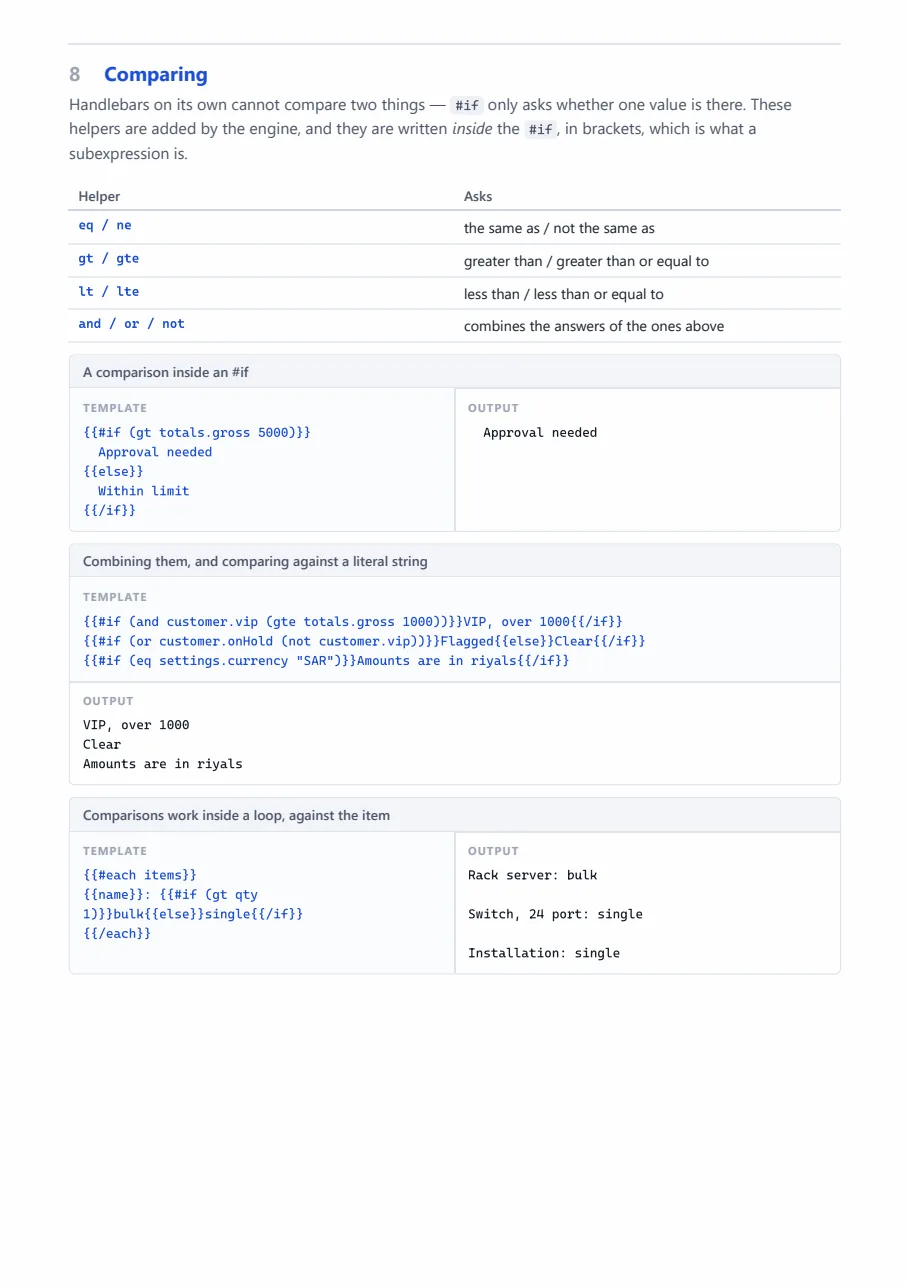
<h2><span class="ordinal">8</span> Comparing</h2>
<p class="section-note">
Handlebars on its own cannot compare two things — <code>#if</code> only asks whether one value
is there. These helpers are added by the engine, and they are written <em>inside</em> the
<code>#if</code>, in brackets, which is what a subexpression is.
</p>
<table class="facts">
<thead>
<tr><th>Helper</th><th>Asks</th></tr>
</thead>
<tbody>
<tr><th>eq / ne</th><td>the same as / not the same as</td></tr>
<tr><th>gt / gte</th><td>greater than / greater than or equal to</td></tr>
<tr><th>lt / lte</th><td>less than / less than or equal to</td></tr>
<tr><th>and / or / not</th><td>combines the answers of the ones above</td></tr>
</tbody>
</table>
<div class="eg">
<div class="eg-title">A comparison inside an #if</div>
<div class="eg-body">
<div class="eg-in"><pre>\{{#if (gt totals.gross 5000)}}
Approval needed
\{{else}}
Within limit
\{{/if}}</pre></div>
<div class="eg-out"><pre>{{#if (gt totals.gross 5000)}}
Approval needed
{{else}}
Within limit
{{/if}}</pre></div>
</div>
</div>
<div class="eg eg--stacked">
<div class="eg-title">Combining them, and comparing against a literal string</div>
<div class="eg-body">
<div class="eg-in"><pre>\{{#if (and customer.vip (gte totals.gross 1000))}}VIP, over 1000\{{/if}}
\{{#if (or customer.onHold (not customer.vip))}}Flagged\{{else}}Clear\{{/if}}
\{{#if (eq settings.currency "SAR")}}Amounts are in riyals\{{/if}}</pre></div>
<div class="eg-out"><pre>{{#if (and customer.vip (gte totals.gross 1000))}}VIP, over 1000{{/if}}
{{#if (or customer.onHold (not customer.vip))}}Flagged{{else}}Clear{{/if}}
{{#if (eq settings.currency "SAR")}}Amounts are in riyals{{/if}}</pre></div>
</div>
</div>
<div class="eg">
<div class="eg-title">Comparisons work inside a loop, against the item</div>
<div class="eg-body">
<div class="eg-in"><pre>\{{#each items}}
\{{name}}: \{{#if (gt qty 1)}}bulk\{{else}}single\{{/if}}
\{{/each}}</pre></div>
<div class="eg-out"><pre>{{#each items}}
{{name}}: {{#if (gt qty 1)}}bulk{{else}}single{{/if}}
{{/each}}</pre></div>
</div>
</div>
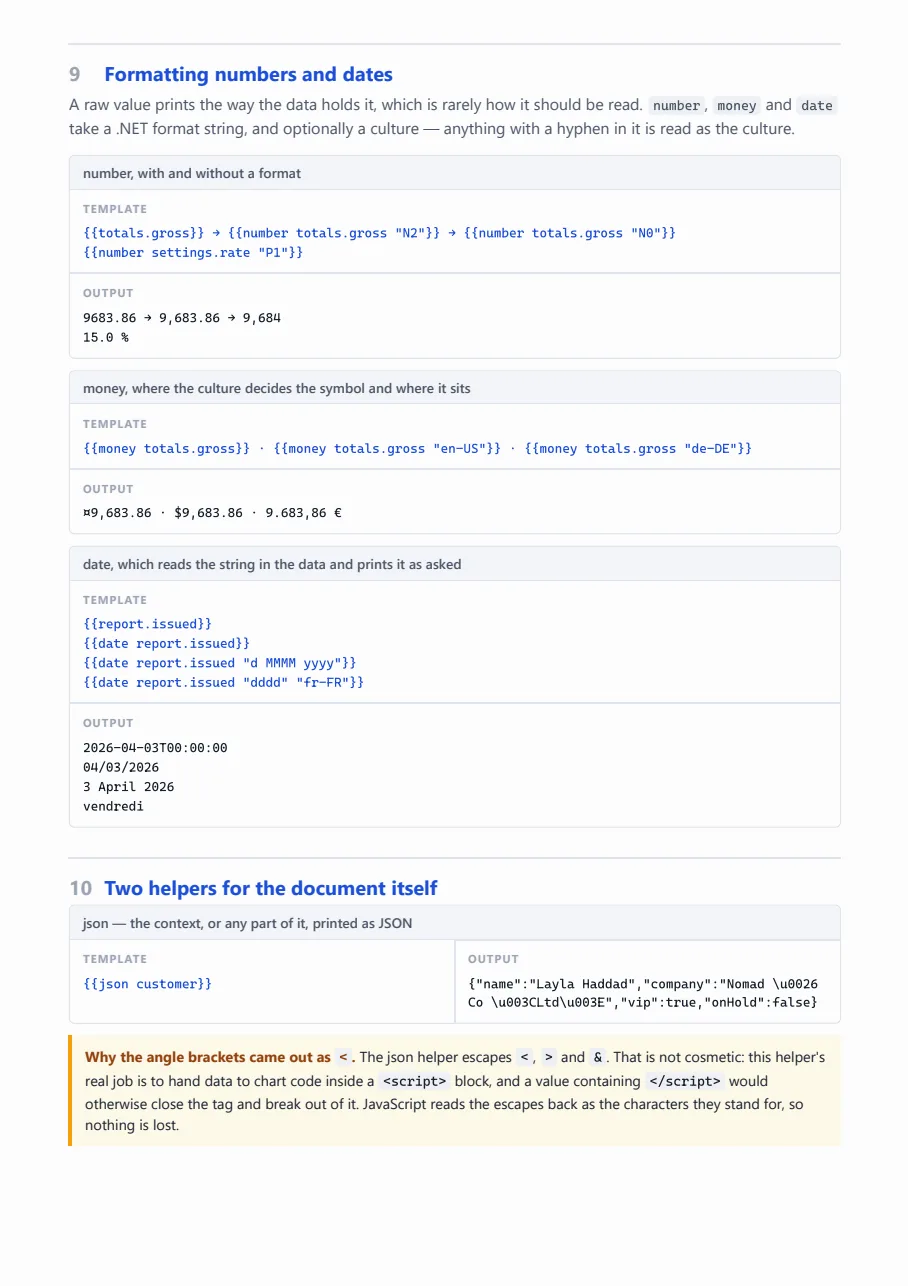
<h2><span class="ordinal">9</span> Formatting numbers and dates</h2>
<p class="section-note">
A raw value prints the way the data holds it, which is rarely how it should be read.
<code>number</code>, <code>money</code> and <code>date</code> take a .NET format string, and
optionally a culture — anything with a hyphen in it is read as the culture.
</p>
<div class="eg eg--stacked">
<div class="eg-title">number, with and without a format</div>
<div class="eg-body">
<div class="eg-in"><pre>\{{totals.gross}} → \{{number totals.gross "N2"}} → \{{number totals.gross "N0"}}
\{{number settings.rate "P1"}}</pre></div>
<div class="eg-out"><pre>{{totals.gross}} → {{number totals.gross "N2"}} → {{number totals.gross "N0"}}
{{number settings.rate "P1"}}</pre></div>
</div>
</div>
<div class="eg eg--stacked">
<div class="eg-title">money, where the culture decides the symbol and where it sits</div>
<div class="eg-body">
<div class="eg-in"><pre>\{{money totals.gross}} · \{{money totals.gross "en-US"}} · \{{money totals.gross "de-DE"}}</pre></div>
<div class="eg-out"><pre>{{money totals.gross}} · {{money totals.gross "en-US"}} · {{money totals.gross "de-DE"}}</pre></div>
</div>
</div>
<div class="eg eg--stacked">
<div class="eg-title">date, which reads the string in the data and prints it as asked</div>
<div class="eg-body">
<div class="eg-in"><pre>\{{report.issued}}
\{{date report.issued}}
\{{date report.issued "d MMMM yyyy"}}
\{{date report.issued "dddd" "fr-FR"}}</pre></div>
<div class="eg-out"><pre>{{report.issued}}
{{date report.issued}}
{{date report.issued "d MMMM yyyy"}}
{{date report.issued "dddd" "fr-FR"}}</pre></div>
</div>
</div>
<h2><span class="ordinal">10</span> Two helpers for the document itself</h2>
<div class="eg">
<div class="eg-title">json — the context, or any part of it, printed as JSON</div>
<div class="eg-body">
<div class="eg-in"><pre>\{{json customer}}</pre></div>
<div class="eg-out"><pre>{{json customer}}</pre></div>
</div>
</div>
<p class="note">
<b>Why the angle brackets came out as <code><</code>.</b> The json helper escapes
<code><</code>, <code>></code> and <code>&</code>. That is not cosmetic: this helper's
real job is to hand data to chart code inside a <code><script></code> block, and a value
containing <code></script></code> would otherwise close the tag and break out of it.
JavaScript reads the escapes back as the characters they stand for, so nothing is lost.
</p>
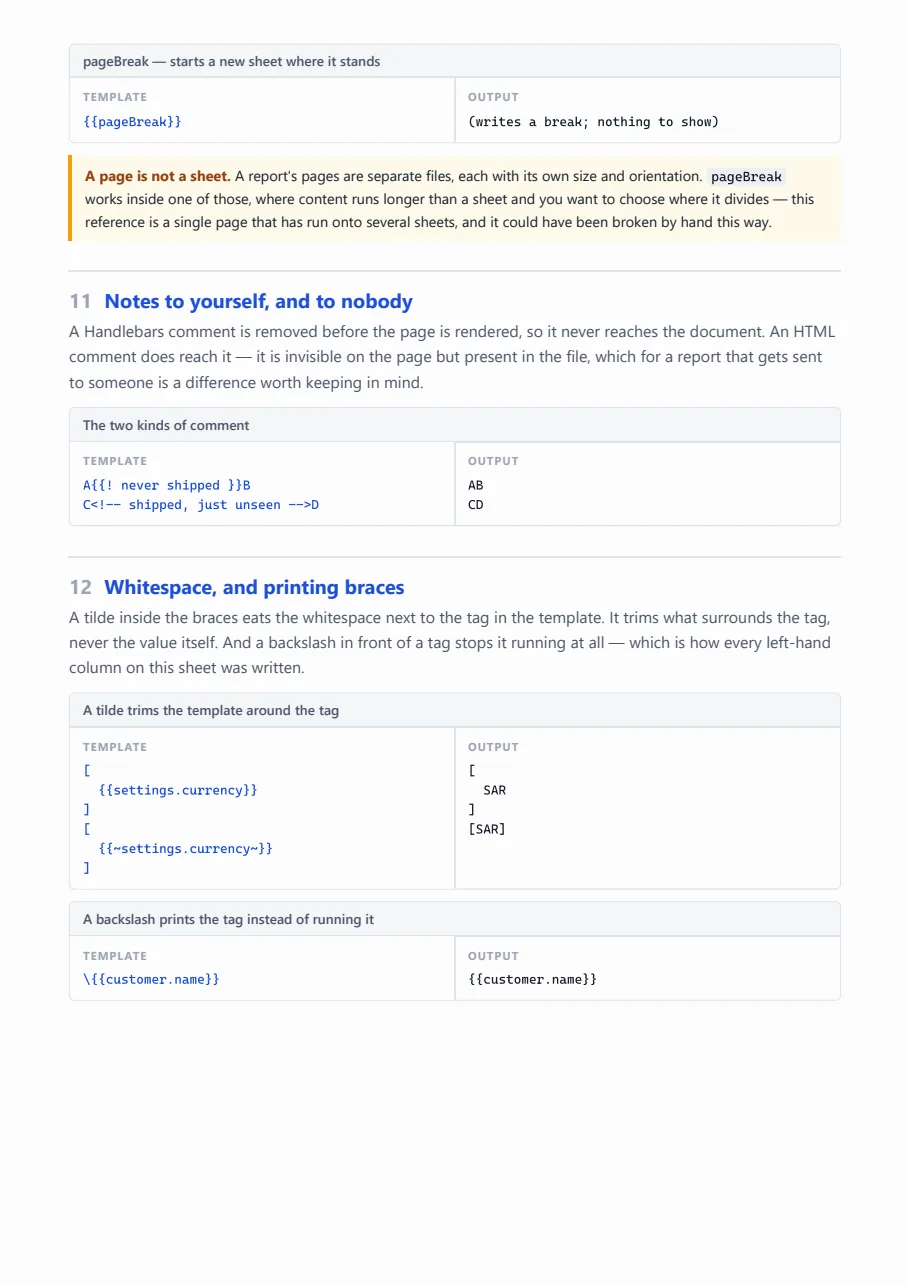
<div class="eg">
<div class="eg-title">pageBreak — starts a new sheet where it stands</div>
<div class="eg-body">
<div class="eg-in"><pre>\{{pageBreak}}</pre></div>
<div class="eg-out"><pre>(writes a break; nothing to show)</pre></div>
</div>
</div>
<p class="note">
<b>A page is not a sheet.</b> A report's pages are separate files, each with its own size and
orientation. <code>pageBreak</code> works inside one of those, where content runs longer than a
sheet and you want to choose where it divides — this reference is a single page that has run
onto several sheets, and it could have been broken by hand this way.
</p>
<h2><span class="ordinal">11</span> Notes to yourself, and to nobody</h2>
<p class="section-note">
A Handlebars comment is removed before the page is rendered, so it never reaches the document.
An HTML comment does reach it — it is invisible on the page but present in the file, which for
a report that gets sent to someone is a difference worth keeping in mind.
</p>
<div class="eg">
<div class="eg-title">The two kinds of comment</div>
<div class="eg-body">
<div class="eg-in"><pre>A\{{! never shipped }}B
C<!-- shipped, just unseen -->D</pre></div>
<div class="eg-out"><pre>A{{! never shipped }}B
CD</pre></div>
</div>
</div>
<h2><span class="ordinal">12</span> Whitespace, and printing braces</h2>
<p class="section-note">
A tilde inside the braces eats the whitespace next to the tag in the template. It trims what
surrounds the tag, never the value itself. And a backslash in front of a tag stops it running
at all — which is how every left-hand column on this sheet was written.
</p>
<div class="eg">
<div class="eg-title">A tilde trims the template around the tag</div>
<div class="eg-body">
<div class="eg-in"><pre>[
\{{settings.currency}}
]
[
\{{~settings.currency~}}
]</pre></div>
<div class="eg-out"><pre>[
{{settings.currency}}
]
[
{{~settings.currency~}}
]</pre></div>
</div>
</div>
<div class="eg">
<div class="eg-title">A backslash prints the tag instead of running it</div>
<div class="eg-body">
<div class="eg-in"><pre>\\{{customer.name}}</pre></div>
<div class="eg-out"><pre>\{{customer.name}}</pre></div>
</div>
</div>
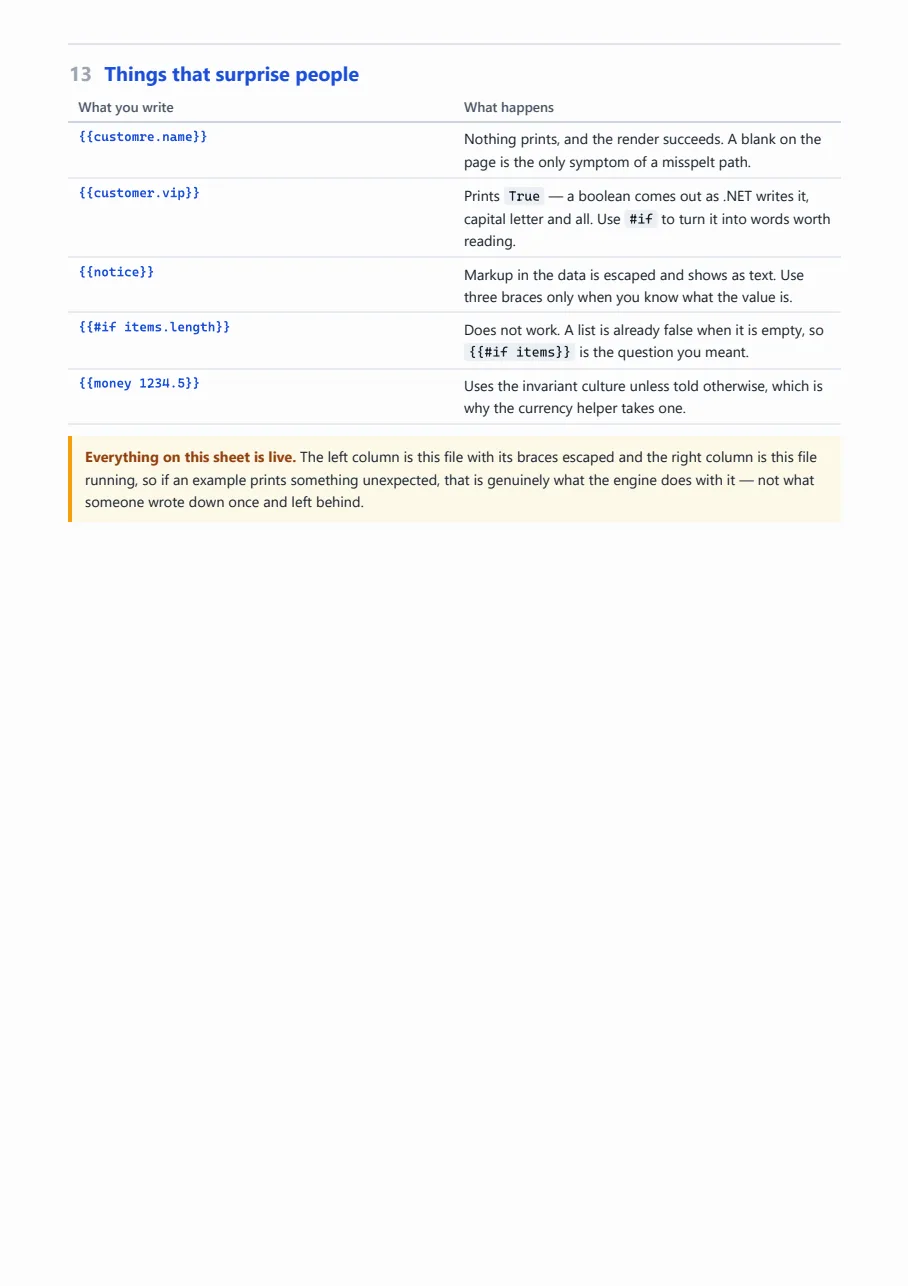
<h2><span class="ordinal">13</span> Things that surprise people</h2>
<table class="facts">
<thead>
<tr><th>What you write</th><th>What happens</th></tr>
</thead>
<tbody>
<tr>
<th>\{{customre.name}}</th>
<td>Nothing prints, and the render succeeds. A blank on the page is the only symptom of a
misspelt path.</td>
</tr>
<tr>
<th>\{{customer.vip}}</th>
<td>Prints <code>{{customer.vip}}</code> — a boolean comes out as .NET writes it, capital
letter and all. Use <code>#if</code> to turn it into words worth reading.</td>
</tr>
<tr>
<th>\{{notice}}</th>
<td>Markup in the data is escaped and shows as text. Use three braces only when you know
what the value is.</td>
</tr>
<tr>
<th>\{{#if items.length}}</th>
<td>Does not work. A list is already false when it is empty, so
<code>\{{#if items}}</code> is the question you meant.</td>
</tr>
<tr>
<th>\{{money 1234.5}}</th>
<td>Uses the invariant culture unless told otherwise, which is why the currency helper
takes one.</td>
</tr>
</tbody>
</table>
<p class="note">
<b>Everything on this sheet is live.</b> The left column is this file with its braces escaped
and the right column is this file running, so if an example prints something unexpected, that
is genuinely what the engine does with it — not what someone wrote down once and left behind.
</p>
</div>
assets/css/report.css
body
{
  margin: 0;
  color: #16202c;
  background: #fff;
  font-family: "Segoe UI", system-ui, sans-serif;
  font-size: 10.5pt;
  line-height: 1.55;
}

.sheet
{
  padding: 10mm 16mm 16mm;

  -webkit-box-decoration-break: clone;
  box-decoration-break: clone;
}

/* ---------- headings ---------- */

h1
{
  margin: 0 0 4px;
  font-size: 22pt;
  font-weight: 700;
  letter-spacing: -.02em;
}

.lede
{
  margin: 0 0 22px;
  padding-bottom: 16px;
  border-bottom: 2px solid #1d4ed8;
  color: #4a5568;
  font-size: 11pt;
}

h2
{
  margin: 26px 0 2px;
  padding-top: 12px;
  border-top: 1px solid #dfe4ec;
  font-size: 13pt;
  font-weight: 700;
  color: #1d4ed8;

  /* A heading alone at the foot of a sheet is a heading in the wrong place. */
  break-after: avoid;
}

h2 .ordinal
{
  display: inline-block;
  min-width: 26px;
  color: #9aa4b4;
}

.section-note
{
  margin: 0 0 12px;
  color: #4a5568;
  break-after: avoid;
}

/* ---------- one example ---------- */

.eg
{
  margin: 0 0 10px;
  border: 1px solid #dfe4ec;
  border-radius: 5px;
  overflow: hidden;

  /* The point of the layout: an example split across sheets teaches nothing on either. */
  break-inside: avoid;
}

.eg-title
{
  padding: 5px 11px;
  background: #f4f6fa;
  border-bottom: 1px solid #dfe4ec;
  font-size: 9pt;
  font-weight: 600;
  color: #4a5568;
}

.eg-body
{
  display: flex;
  align-items: stretch;
}

.eg-in,
.eg-out
{
  flex: 1;
  min-width: 0;
  padding: 9px 11px;
}

.eg-in
{
  border-right: 1px solid #dfe4ec;
  background: #fbfcfe;
}

/* Which half is which, said once per example without a row of headings. */
.eg-in::before,
.eg-out::before
{
  display: block;
  margin-bottom: 5px;
  font-family: "Segoe UI", system-ui, sans-serif;
  font-size: 7.5pt;
  font-weight: 700;
  letter-spacing: .08em;
  text-transform: uppercase;
  color: #9aa4b4;
}

.eg-in::before { content: "Template"; }
.eg-out::before { content: "Output"; }

.eg-in pre,
.eg-out pre
{
  margin: 0;
  font-family: "Cascadia Mono", Consolas, ui-monospace, monospace;
  font-size: 8.5pt;
  line-height: 1.5;

  white-space: pre-wrap;
  overflow-wrap: anywhere;
}

.eg-in pre { color: #1d4ed8; }

/* A whole-width example, for the ones whose template is too wide to sit beside its output. */
.eg--stacked .eg-body { display: block; }

.eg--stacked .eg-in
{
  border-right: 0;
  border-bottom: 1px solid #dfe4ec;
}

/* ---------- the data everything binds against ---------- */

.data
{
  margin: 0 0 4px;
  padding: 11px 13px;
  border: 1px solid #dfe4ec;
  border-left: 3px solid #1d4ed8;
  border-radius: 5px;
  background: #fbfcfe;
}

.data pre
{
  margin: 0;
  font-family: "Cascadia Mono", Consolas, ui-monospace, monospace;
  font-size: 8pt;
  line-height: 1.45;
  white-space: pre-wrap;
}

/* ---------- prose furniture ---------- */

code
{
  padding: 1px 4px;
  border-radius: 3px;
  background: #eef1f6;
  font-family: "Cascadia Mono", Consolas, ui-monospace, monospace;
  font-size: 8.8pt;
}

.note
{
  margin: 10px 0 0;
  padding: 8px 11px;
  border-left: 3px solid #f59e0b;
  background: #fffbeb;
  font-size: 9.5pt;
  break-inside: avoid;
}

.note b
{
  color: #92400e;
}

table.facts
{
  width: 100%;
  margin: 0 0 10px;
  border-collapse: collapse;
  font-size: 9.5pt;
  break-inside: avoid;
}

table.facts th,
table.facts td
{
  padding: 4px 8px;
  border-bottom: 1px solid #e8ecf3;
  text-align: left;
  vertical-align: top;
}

table.facts th
{
  width: 34%;
  font-family: "Cascadia Mono", Consolas, ui-monospace, monospace;
  font-size: 8.5pt;
  font-weight: 600;
  color: #1d4ed8;
  white-space: nowrap;
}

table.facts thead th
{
  font-family: "Segoe UI", system-ui, sans-serif;
  font-size: 9pt;
  color: #4a5568;
  border-bottom: 1.5px solid #cbd3e0;
}
shared-assets/css/house.css
/*
  The project's house style: what every report in it looks like before it looks like itself.

  It is in shared-assets rather than in a report because it is the project's, not one report's —
  the palette, the type, the sheet, the running header, and the handful of parts (card, chip, pill,
  meter, table) that every report here is assembled from. A report's own stylesheet composes these
  into its layout; it does not redecide what a card is.

  A template references it as assets/css/house.css, exactly as it references its own files. The
  shared folder is searched behind the report's own, so the path means the same thing in every
  report — and a report that needs its own version keeps a file at that path and wins.
*/

:root
{
  /* Named for the job, not the hue, so a rebrand is this block and nothing else. */
  --ink: #0f172a;
  --ink-soft: #475569;
  --ink-faint: #6b7a90;
  --ink-invert: #ffffff;

  --page: #ffffff;
  --panel: #ffffff;
  --panel-2: #f8fafc;
  --rule: #e2e8f0;
  --rule-soft: #eef2f7;

  --brand: #0b1f3a;
  --brand-2: #12325c;
  --accent: #1d4ed8;
  --accent-soft: #eef3ff;
  --cyan: #0ea5e9;

  --good: #047857;
  --good-soft: #e7f6f0;
  --warn: #b45309;
  --warn-soft: #fdf3e3;
  --bad: #b91c1c;
  --bad-soft: #fdeceb;
  --idle: #64748b;
  --idle-soft: #f1f5f9;

  --radius: 7px;
  --radius-sm: 4px;
}

body
{
  margin: 0;
  color: var(--ink);
  background: var(--page);

  /*
    No Arabic face here, and no Arabic font in shared-assets at all. Naming one for every report in
    the project meant seven reports asked for a typeface none of them loads, so what they actually
    printed in was the second name in the list. The one Arabic report carries the family and the
    files itself.
  */
  font-family: "Segoe UI", Tahoma, sans-serif;
  font-size: 11px;
  line-height: 1.55;

  /* Every figure in this project is read down a column, so digits are the same width. */
  font-variant-numeric: tabular-nums;
  -webkit-font-smoothing: antialiased;
}

/*
  The sheet.

  The engine prints with no page margin, so the edges are the report's own to leave. Cloned decoration
  keeps the padding on every sheet a long page runs onto rather than only the first, and the top
  padding is what the fixed running header sits in — it reserves no room of its own.
*/
.sheet
{
  box-sizing: border-box;
  width: 794px;
  min-height: 1123px;
  padding: 96px 40px 44px;

  -webkit-box-decoration-break: clone;
  box-decoration-break: clone;
}

/* ---------- the running header, on every sheet ---------- */

/*
  The engine fixes #report-page-header to the top of the sheet; everything below is this project's
  band inside it. A band rather than a line of text: it is the first thing on every page and the
  only thing carrying the mark, and at 76px it is still under a fifteenth of the sheet.
*/
#report-page-header
{
  height: 76px;
  background: linear-gradient(105deg, var(--brand) 0%, var(--brand-2) 62%, #17416f 100%);
  color: var(--ink-invert);
}

.masthead
{
  display: flex;
  align-items: center;
  gap: 14px;
  height: 73px;
  padding: 0 40px;
  box-sizing: border-box;
}

/* The accent edge, under the band. Three pixels is enough to read as deliberate. */
#report-page-header::after
{
  content: "";
  display: block;
  height: 3px;
  background: linear-gradient(to left, var(--accent), var(--cyan) 55%, rgba(14, 165, 233, 0));
}

.masthead .logo
{
  width: 30px;
  height: 30px;
  flex: 0 0 auto;
}

.masthead .titles
{
  display: flex;
  flex-direction: column;
  gap: 1px;
  min-width: 0;
}

.masthead .org
{
  font-size: 12.5px;
  font-weight: 700;
  letter-spacing: -.005em;
}

.masthead .subject
{
  font-size: 10.5px;
  color: #a9c2e0;
}

.masthead .meta
{
  margin-inline-start: auto;
  display: flex;
  flex-direction: column;
  align-items: flex-end;
  gap: 2px;
  text-align: end;
  white-space: nowrap;
}

.masthead .period
{
  font-size: 11px;
  font-weight: 600;
}

/* A quiet outline rather than a filled badge: it is a caveat, not a headline. */
.masthead .classification
{
  padding: 1px 7px;
  border: 1px solid rgba(255, 255, 255, .34);
  border-radius: 999px;
  font-size: 9px;
  color: #cddcee;
}

/* ---------- the page's own heading, under the band ---------- */

.pagehead
{
  display: flex;
  align-items: flex-end;
  gap: 12px;
  padding-bottom: 9px;
  border-bottom: 1px solid var(--rule);
}

.pagehead h1
{
  margin: 0;
  font-size: 19px;
  font-weight: 700;
  letter-spacing: -.015em;
}

.pagehead .lede
{
  margin: 3px 0 0;
  color: var(--ink-soft);
  font-size: 10.5px;
}

.pagehead .stamp
{
  margin-inline-start: auto;
  color: var(--ink-faint);
  font-size: 10px;
  white-space: nowrap;
}

/* ---------- parts ---------- */

.card
{
  box-sizing: border-box;
  padding: 12px 14px 10px;
  background: var(--panel);
  border: 1px solid var(--rule);
  border-radius: var(--radius);
}

.card-head
{
  display: flex;
  align-items: baseline;
  gap: 8px;
  margin-bottom: 8px;
}

.card h2
{
  margin: 0;
  font-size: 12.5px;
  font-weight: 700;
}

.card .note
{
  margin-inline-start: auto;
  color: var(--ink-faint);
  font-size: 9.5px;
  white-space: nowrap;
}

/* A chart draws itself left to right whatever the page does, and its own labels sit inside it. */
.chart
{
  width: 100%;
  direction: ltr;
}

.chip
{
  display: inline-flex;
  align-items: center;
  gap: 4px;
  padding: 1px 7px;
  border-radius: 999px;
  font-size: 9.5px;
  font-weight: 700;
  line-height: 1.7;
  white-space: nowrap;
}

.chip--good { background: var(--good-soft); color: var(--good); }
.chip--bad  { background: var(--bad-soft);  color: var(--bad); }
.chip--warn { background: var(--warn-soft); color: var(--warn); }
.chip--idle { background: var(--idle-soft); color: var(--idle); }

/*
  A status, as a word with a dot rather than as a filled block: eight of them down a table column
  would otherwise be eight blocks of colour competing with the figures beside them.
*/
.pill
{
  display: inline-flex;
  align-items: center;
  gap: 5px;
  font-size: 10px;
  font-weight: 600;
  white-space: nowrap;
}

.pill::before
{
  content: "";
  width: 7px;
  height: 7px;
  border-radius: 50%;
  background: currentColor;
  flex: 0 0 auto;
}

.pill--good { color: var(--good); }
.pill--warn { color: var(--warn); }
.pill--bad  { color: var(--bad); }
.pill--idle { color: var(--idle); }
.pill--done { color: var(--accent); }

/*
  A proportion, drawn rather than written. Vector, so it stays sharp where a canvas would not — the
  small measures are the ones a reader leans in on.
*/
.meter
{
  height: 5px;
  border-radius: 3px;
  background: var(--rule-soft);
  overflow: hidden;
}

.meter > span
{
  display: block;
  height: 100%;
  border-radius: 3px;
  background: var(--accent);
}

.meter--good > span { background: var(--good); }
.meter--warn > span { background: var(--warn); }
.meter--bad  > span { background: var(--bad); }

/* ---------- tables ---------- */

/*
  Fixed layout and a header group, which is the pair that keeps a long table on the sheet: without
  the first, columns size to their content and the far one runs off the paper; without the second,
  a table that paginates leaves the next sheet as unlabelled columns of numbers.
*/
table.grid
{
  width: 100%;
  table-layout: fixed;
  border-collapse: collapse;
  font-size: 10.5px;
}

table.grid thead { display: table-header-group; }

table.grid tr { break-inside: avoid; }

/*
  Border-box, because a fixed layout takes the width it is given as the whole column: with padding
  added on top instead, six columns quietly cost another 96px and the one column left on auto pays
  for all of it.
*/
table.grid th,
table.grid td { box-sizing: border-box; }

table.grid th
{
  padding: 6px 8px;
  background: var(--panel-2);
  border-bottom: 1px solid var(--rule);
  color: var(--ink-soft);
  font-size: 9.5px;
  font-weight: 700;
  text-align: start;
  white-space: nowrap;
}

table.grid td
{
  padding: 6px 8px;
  border-bottom: 1px solid var(--rule-soft);
  vertical-align: middle;
  overflow-wrap: break-word;
}

table.grid tbody tr:last-child td { border-bottom: 0; }

.num
{
  text-align: end;
  font-weight: 600;
}

/* ---------- the foot of the page ---------- */

.footnote
{
  margin-top: 12px;
  padding-top: 8px;
  border-top: 1px solid var(--rule);
  color: var(--ink-faint);
  font-size: 9.5px;
}

/*
  The running footer, which the browser draws rather than the page.

  It is a document of its own at print time: this stylesheet is read and sent along with it, so type
  and layout arrive, but nothing it would have to fetch does — no webfont, no image, no background.
  So it is set in whatever face the renderer has, and kept to figures and a code, which read the same
  in any of them.
*/
.pagefoot
{
  display: flex;
  align-items: center;
  justify-content: space-between;
  width: 100%;
  padding: 0 40px;
  box-sizing: border-box;
  color: #8a97a8;
  font-family: "Segoe UI", Arial, sans-serif;
  font-size: 8.5px;
  letter-spacing: .04em;
}
What it carries
Stylesheets, scripts, images and fonts travel inside the report, so nothing is resolved
from the outside while it renders. Anything under shared-assets/ belongs to
the project rather than to this report — held once for every report in it, and reached
from the template at the same assets/… path as the report's own.